
ZeroTier Remote Networking
https://my.zerotier.com Tutorial: Intranet penetration tool ZeroTier, from simple to complex usage, nothing held back, all released in one episode_Bilibili_bilibili
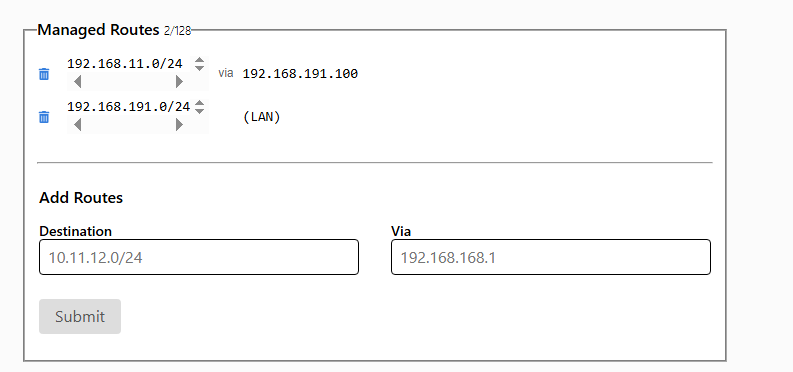
Modify the routing table
LAN points to bypass router device A LAN does not point to bypass router device B External network device C https://my.zerotier.com/network
routing table A : ZerpTier``192.168.191.0/24
routing table B : LAN 192.168.11.0/24
After the soft router installs ZerpTier , the soft router has the ZerpTier network routing table
LAN points to bypass router device Acan accessexternal network device C192.168.191.0/24, device A which points to the bypass router knows how to access otherZerpTierexternal network device C, external network device Cexternal network device Ccannot accessLAN points to bypass router device A
external network device C, although it has the ZerpTier network routing table, it can only access the bypass router 192.168.191.39, cannot access LAN points to bypass router device A
- Solution
Therefore it is necessary to add on ZeroTier manually add a routing table, pointing to the bypass router at ZeroTier IP address

This is equivalent to adding for the external network device a routing table B
LAN does not point to bypass router device Bcannot accessexternal network device C
Similarly, add routing information on the main router, directing the 192.168.191.0/24 connection to the bypass router, letting the bypass router use its own routing table to route
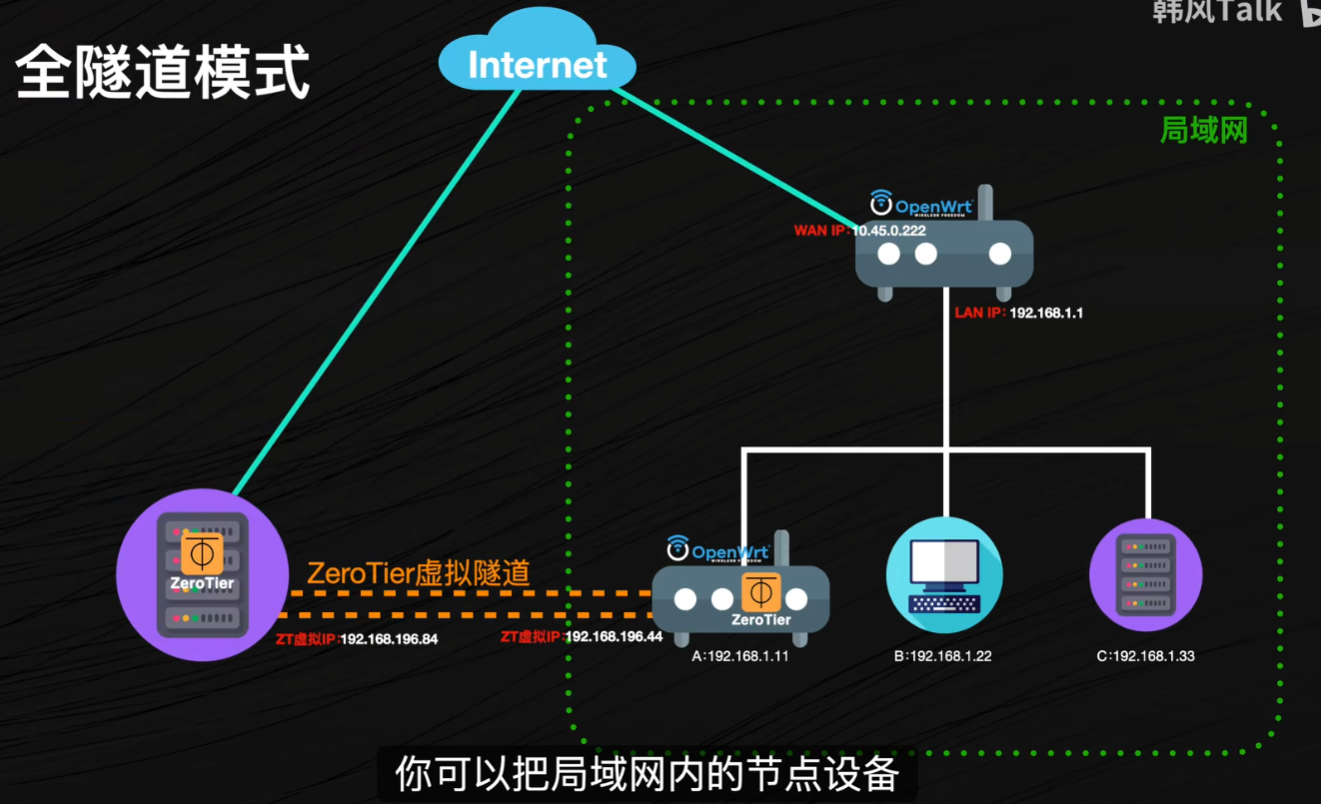
Full tunnel mode
Let external network devices access the network through the home soft router, not using their own network, the home one will connect again
This is equivalent to making all network traffic of a device go through home, drawback: speed is very slow when P2P is not possible
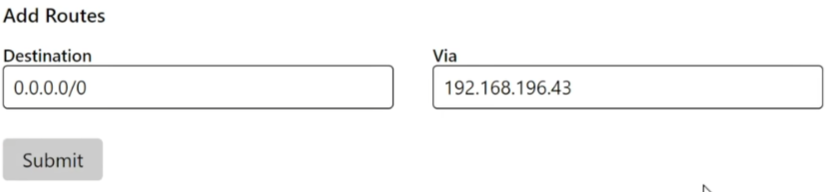
0.0.0.0/0
This is equivalent to external network device C all following this routing table, forwarding traffic to soft router
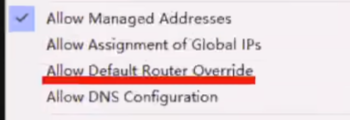
Then turn on the option to override the default route
Allow Default Router Override
Linux Install ZeroTier and node controller
ZeroTier
Port opening UDP 9993 and TCP 9993
node controller TCP 3443
In addition, uninstall command:
dpkg -P zerotier-one
rm -rf /var/lib/zerotier-one/
Node 506f2eff25
ZeroTier
One click install command:
curl -s https://install.zerotier.com | sudo bash
Uninstall: dpkg -P zerotier-one rm -rf /var/lib/zerotier-one/
Start and enable auto start
systemctl start zerotier-one.service
systemctl enable zerotier-one.service
Enter the installation directory cd /var/lib/zerotier-one/
Generate node configuration zerotier-idtool initmoon identity.public> moon.json
Modify moon.json "stableEndpoints": []Change to "stableEndpoints": ["47.xx.xx.10/9993"]
Generate signature zerotier-idtool genmoon moon.json
Create directory mkdir moons.d
Move the generated signature to the created directory mv 00000050c0acc251.moon moons.d/
Restart service systemctl restart zerotier-one
----Join---
Join the moon server, use the node generated during installation
Join the moon
Then in openwrt add in
zerotier-cli orbit
zerotier-cli orbit xxxx xxxx
Then restart
linux : systemctl restart zerotier-one
openwrt : service zerotier restart
Self hosted node controller
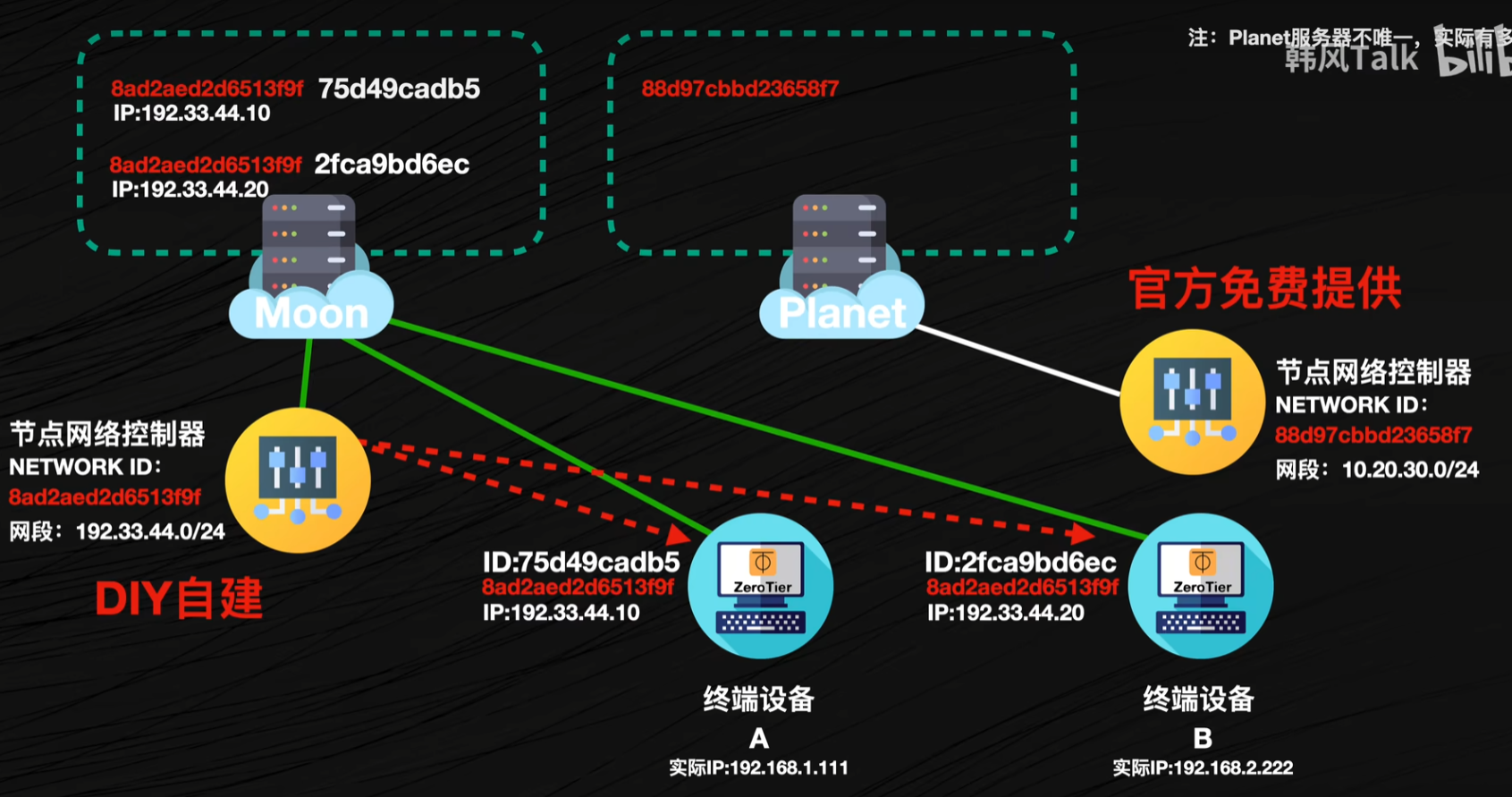
A self hosted Moon server automatically chooses whether to go through moon or the official planet or p2p based on connected devices, but if the official planet is unreachable, it cannot be used node network controller, therefore a self hosted one is needed node network controller to authorize access between nodes
docker run -d --name ztncui -p 3000:3000 -e HTTP_ALL_INTERFACES=yes -e HTTP_PORT=3000 -e ZTNCUI_PASSWD=password keynetworks/ztncui
Error [version `GLIBCXX_3.4.20 not found solution - Jianshu (jianshu.com)](https://www.jianshu.com/p/050b2b777b9d)
 Then
Then easy setup
Then let the node controller join itself, this way public network port access can be avoided
zerotier-cli join xxxxx
Command
systemctl restart zerotier-one

netstat -tulnp
sudo systemctl status ztncui
zerotier-cli listpeers


linux : systemctl restart zerotier-one
openwrt :  service zerotier restart

zerotier-cli info -j

Check tcpFallbackActive whether it is true ,If so, it means the current connection uses the slowest relay mode, so it is definitely not a direct connection

zerotier-cli peers
Check the corresponding LEAF of the path column for whether there is a ip address, if there is none, it means it is relay,also not a direct connection
Test. Through ping check the latency, transfer a large file to check the rate, if the latency is low and the transfer speed is close to the upload and download bandwidth, it can basically be determined to be a direct connection

linux : `systemctl restart zerotier-one`
openwrt :  `service zerotier restart`
Test
1440P
Computer uses software, not connected to soft router, mobile data cannot connect, mobile wifi connects and finally P2P, fast
(Outdoor phone connects to computer, computer uses soft router) Computer uses software, connected to soft router, mobile data connects to computer zerotier IP, mobile data can connect, slow, latency 400, mobile wifi cannot connect
(Outdoor phone connects to the soft router, the soft router connects to the computer) The computer does not use software, connects to the soft router, the phone traffic connects to the LAN computer IP, and according to the routing table it will be forwarded to the soft router zerotier IP, and it can connect,Extremely slow , under the same wifi, it is still the LAN computer IP, meaningless
Self-hosted moon The connection is very fast, but during testing there is occasional lag,wifi Yes P2P, very smooth, but the phone traffic cannot use p2p
In addition, because zerotier itself is proxy software, after the phone uses zerotier it cannot use clash