
Video
Movie Name
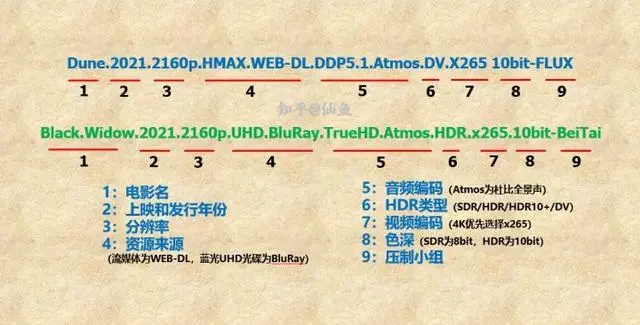
Resolution
Currently, we generally only see two types, 1080P and 2160P, corresponding to HD and 4K UHD respectively. If you are currently using a 4K TV, it is recommended to choose 2160P first;
Movie Source
Currently, there are 3 common types: WEB-DL, BluRay-REMUX, BDRIP.
WEB-DL should be the most common now, with sources from overseas streaming platforms such as Netflix, Disney, and HBO-MAX. The maximum bitrate can reach around 17Mb, and the size of a 2-hour movie is over 15GB. The audio track is mainly Dolby Atmos (ddp core);
BluRay-REMUX is made from Blu-ray disc sources by removing unnecessary extras and audio tracks from the Blu-ray disc. Generally, the source and main audio tracks are not compressed, so the overall bitrate can reach around 80Mb, and the included audio tracks are also lossless next-generation surround.
BD-RIP is Blu-ray compression, and this situation is more varied. Depending on the characteristics of the release group, the bitrate ranges from a few megabits to several tens of megabits, and everyone can judge based on the movie file size.
Audio Encoding
Common audio encodings include DDP 5.1, DDP 5.1 (Atmos), dd5.1, dts5.1, dts-hdma, dtsX, AAC, etc.
AAC/FLAC/LPCM
DD 5.1 dd 5.1 is the most basic Dolby digital 5.1 surround sound, generally used only in relatively old films
DDP 5.1 (ATMOS) The full name of ddp 5.1 is Dolby Digital Plus. It often appears together with WEB-DL, because the Dolby Atmos of overseas streaming platforms all use the ddp 5.1 core, and the bitrate is generally 640Kb or 768Kb. If you have an Atmos amplifier or soundbar, you can already experience the Atmos effect. Note here that if the movie file name has atmos after ddp 5.1, then Dolby Atmos is definitely supported; if there is only ddp 5.1, then Atmos may or may not be supported.
TrueHD Dolby TrueHD is a lossless next-generation audio track with a relatively high bitrate, so it only appears in Blu-ray resources. Because lossless Dolby Atmos uses the TrueHD core, when the file name only has TrueHD, Atmos may be activated, or it may just be traditional lossless surround sound;
dts Family Because dts has a relatively high bitrate, no streaming source will use it (except Sony Bravia Core). dts sources are all DVD or Blu-ray disc sources.
dts 5.1 is the most basic 5.1 surround sound, with a fixed bitrate of 1536Kb; dts-HDMA is the lossless next-generation audio track of the dts version, with a maximum bitrate of up to 37Mb; dtsX is the Atmos of the dts version, called Immersive Audio in Chinese, and its core is a dts-hdma audio track, so the bitrate is generally very high.
Video Encoding
Video encoding is actually also a video compression algorithm. Common ones include H264 (avc), H265 (hevc), and AV1; H264 encoding often appears together with 1080P, with a lower compression rate; H265 encoding is one of the standard encodings for 4K video. UHD Blu-ray discs, Netflix, Disney, and other 4K videos all use H265 encoding. H265 has a relatively high compression rate (relative to H264). To achieve the same clarity, H265 may only need half the bitrate of H264. In addition, there is also AV1 encoding. AV1 is a 4K/8K video encoding led by Google, an open-source format developed by major companies such as Apple, Netflix, and Microsoft. It does not require licensing and is completely free
SDR/HDR/Dolby Vision
**SDR (8bit)**SDR is relative to HDR, and is generally an 8BIT bit depth source.
**HDR (10bit)**HDR means high dynamic range. Simply put, it can make the picture contrast greater and contain more information, thereby making the details in dark and bright parts of the picture richer. HDR requires 10bit bit depth, so it is also called HDR10. As the name implies, all HDR films are definitely 10bit.
Dynamic HDR (Dolby Vision and HDR10+)(abbreviated as DV)
HDR10 is a static HDR standard. A movie uses the same picture and brightness scheme throughout, while Dolby Vision and HDR10+ are dynamic HDR standards, and each frame can use a different brightness and color mapping scheme.
Dolby Vision generally appears as dv in movie file names. Only when both the player and the display device support Dolby Vision can the correct colors be displayed, see the two images below.
When Dolby Vision is not supported, the colors will be more purple and green:
Currently, Windows systems cannot decode DV well. Only the built-in Movies and TV app in win10 can display normal colors after installing a specific decoder (other third-party players, decoders, and renderers absolutely cannot). But if your monitor does not support DV, the brightness information cannot be represented either, and it will look very dark.
If the downloaded version is Dolby Vision (DV), just switch to another high-definition source

 Also note one more thing: the vast majority of projectors support at most HDR10, and neither Dolby Vision nor HDR10+ can be played correctly.
Stuttering Issue
Settings, Player, Video, adjust display refresh rate, select Start and end