
DNS
Basic DNS Concepts
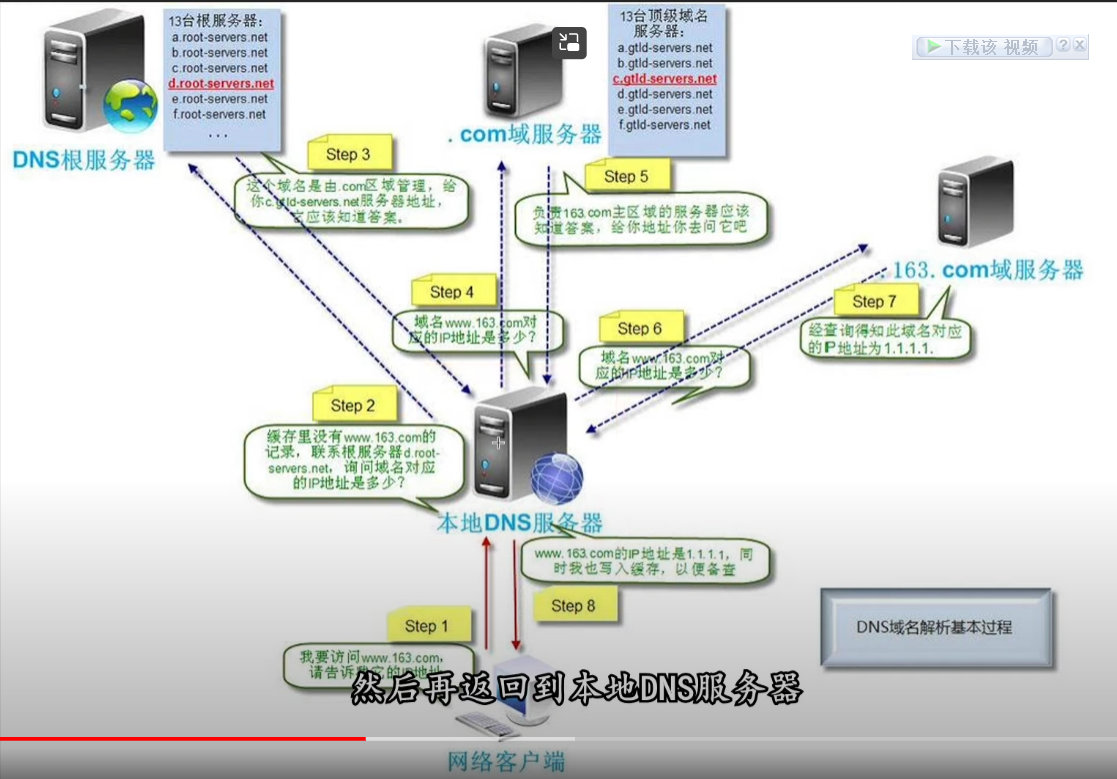
DNS Hijacking
Hijacking DNS servers, obtaining the ability to resolve certain domain names through certain means, and then modifying the resolution result of this domain name, causing access to this domain name to be redirected from the original IP address to a modified specified IP address, causing access to this domain name to be redirected from the original IP address to a modified specified IP, meaning that specific specific websites cannot be accessed or a fake website is accessed, thereby achieving the purpose of stealing data or destroying the original normal service

DNS Pollution
It is a way to make ordinary users get a fake host IP and be unable to communicate with it. It is a working method of DNS cache poisoning attack. Since ordinary DNS queries have no mechanism at all, and DNS queries are usually based on udp, which is a connectionless and unreliable protocol, because DNS queries are very easily tampered with. By performing intrusion detection on DNS queries on udp port 53, once a request matching the keyword is found, it immediately disguises itself as the resolution server of the target domain name and returns a fake result to the querier. DNS pollution occurs at the first step of the user request, directly interfering with the user DNS request at the protocol level. At present, many websites that are prohibited from being accessed are implemented through DNS (Youtube..FB)

DNS Leak
Due to configuration or network setting errors, the user DNS requests bypassthe expected encrypted tunnel or proxy, and are directly exposed to the network provider or other potential monitors
Under normal circumstances, the DNS server is provided by our isp operator. If you do not modify it and use it directly, that means they can monitor and record any server request you send You can use an online DNS test to detect the results of their access to foreign websites. If mainland DNS appears, that means your DNS has already leaked out, and resolution will also query from the DNS closest to you. Domain name IP - then the records you query will be monitored
When you visit domestic websites, resolution is performed through domestic DNS resolution servers, so the response page speed is fast and access latency is low Domestic websites use domestic DNS, foreign websites use foreign DNS. Doing this can not only effectively prevent pollution, but more importantly, when you browse foreign network addresses on the domestic network, they are shunted to foreign DNS for resolution, rather than using domestic public servers such as 114 for resolution. Then on domestic DNS serversthere will be no resolution records of you resolving foreign domain names. As long as no Chinese DNS appears when detecting foreign DNS, that means everything is normal. If there is, then generally domestic DNS will resolve foreign domain names, and access information will still leak. It is recommended to use encrypted DNS, because the probability of these servers being polluted is very small and security is high. It is not recommended to use port 53, such as 8.8.8.8, 1.1.1.1
Authoritative DNS
Authoritative DNS is the DNS server set at the domain registrar for records of a specific domain name (for example, example. com), used for the management of the specific domain name itself (addition, deletion, modification, etc.). An authoritative DNS server only performs domain name resolution for domain names it owns, and refuses access for domain names that are not its own. For example, querying the domain name test. com from the authoritative DNS server of example. com will definitely fail.
Authoritative DNS is a server that resolves domain names after authorization from the upper level, and it can also transfer resolution authorization to others. For example, the COM top level server can authorize the authoritative server of the domain dns. com as NS. ABC. COM, and NS. ABC. COM can also transfer authorization to NS. DDD. COM, so NS. DDD. COM becomes the actual authoritative server of ABC. COM. Usually the results of our domain name resolution all come from authoritative DNS. For example, the authoritative DNS servers of dns.com are ns1. dns. com ns2. dns. co of Diensi
Impact of DNS on Speed
Steam下载慢#^sg5f8u
DNS has no relationship at all with your physical network speed, but it may affect the cdn node judgment of location and indirectly affect speed. Not using the local operator dns may cause slower downloads in applications such as steam What it can improve is only your response speed to reach the webpage end It is determined according to the latency size and cache of the DNS server used In China, although you can use Google DNS for normal resolution and use, and because of anycast the returned IP is also very accurate the latency is several times higher than abroad Therefore DNS is only related to the response speed of opening websites, related to security, and has no relationship at all with the bitrate of the root network speed Because of WEBRTC leakage, if a website has webRTC functionality, it can ignore the proxy ip and record the real ip
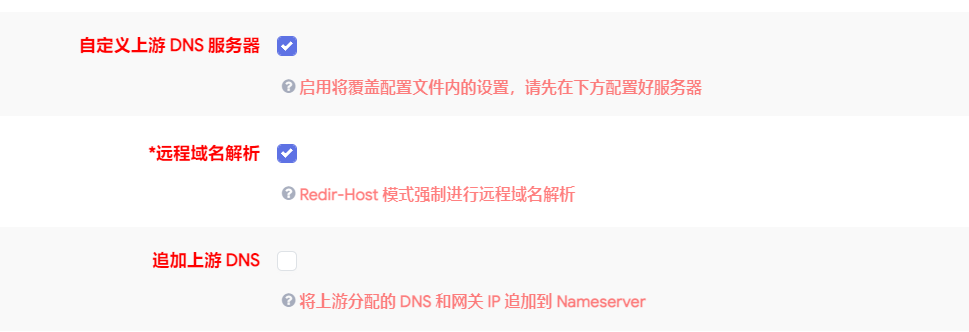
Remote DNS
When using remote dns, the target address sent by the browser to the proxy server is domain name plus port. When not using remote dns, what the browser sends to the proxy server is ip plus port.
When using remote dns, the target address sent by the browser to the proxy server is domain name plus port. When not using remote dns, what the browser sends to the proxy server is ip plus port.
For example, if you want to visithttps://facebook.com
If remote is used dns, the request sent to the proxy server may be in the following form
CONNECT facebook. com:443 HTTP/1.1
If remote dns is not used, the request sent to the proxy server may be in the following form
CONNECT 1.2.3.4: 443 HTTP/1.1
Foreign
tls://1.1.1.1/dns-query
tls://dns. google
https://dns. google/dns-query
tls://dns11.quad9.net
https://dns11.quad9.net/dns-query
Pitfalls
Access to the school website cannot use encrypted DNS, only ordinary dns can be used Found encrypted DNS resolution. After messing with DNS for a long time, access to the school website cannot use encrypted DNS, only ordinary dns can be used Found that encrypted DNS resolution records are fewer than ordinary ones. cname resolution records are fewer than ordinary ones cname
tls://dns.pub
tls://dns.alidns.com
https://doh.pub/dns-query
https://dns.pub/dns-query
https://dns.alidns.com/dns-query
208.67.222.222
199.91.73.222
114.114.114.114
114.114.115.115
218.30.118.6
208.67.220.220
9.9.9.9
140.207.198.6
52.80.66.66
210.2.4.8
8.8.8.8
123.125.81.6
101.226.4.6
117.50.11.11
119.29.29.29
223.5.5.5
119.29.29.29
180.76.76.76
1.2.4.8
202.102.134.68
202.102.128.68
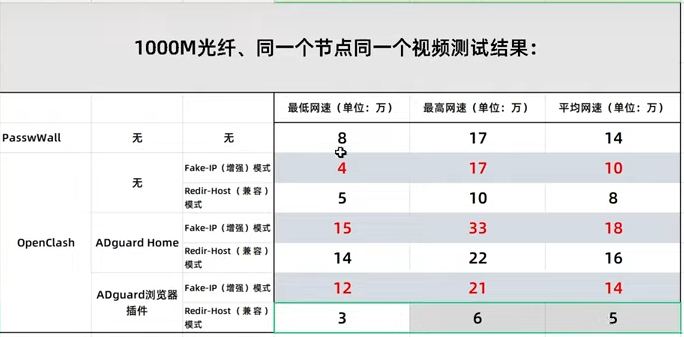
ADguardHome
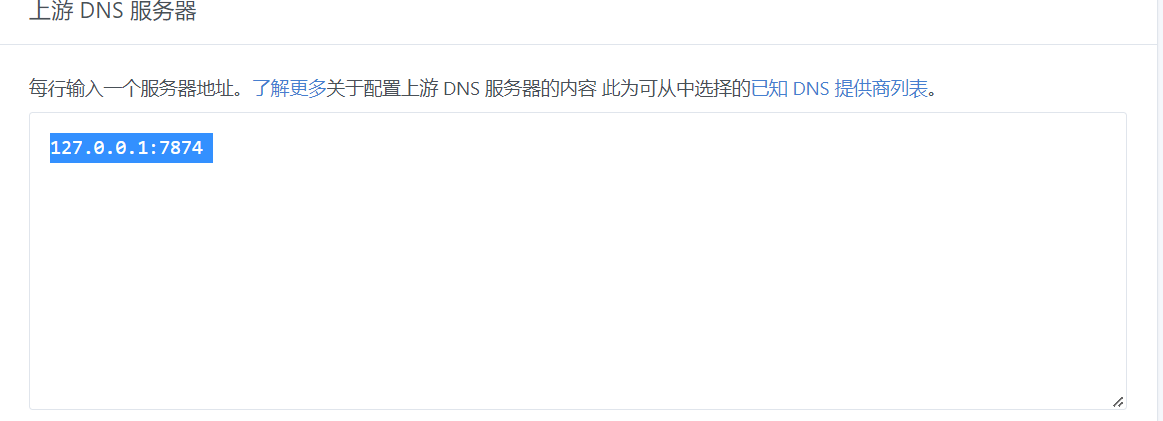
Upstream DNS can be understood as remote DNS
Bootstrap dns server is used to resolve and connect to the fastest upstream server
For Bootstrap dns, fill in the address of the local operator. Search Baidu for local operator DNS
You can ping the speed
 ADguard uses the DNS configuration in clash
 Cannot access / page lost / copyright restriction / slow loading:It belongs to an upstream dns resolution problem
Ads cannot be blocked / webpage opens but video cannot play / prompt says there is an ad plugin / some functions in the webpage cannot be called:It belongs to a rule problem
Cannot access / page lost / copyright restriction / slow loading:It belongs to an upstream dns resolution problem
Ads cannot be blocked / webpage opens but video cannot play / prompt says there is an ad plugin / some functions in the webpage cannot be called:It belongs to a rule problem